 |
 05-10-2008, 10:55 AM
|
#1
|
|
Junior Member
Join Date: May 2008
Posts: 1
SUN #596
|
Photo Help
Can someone please explain how to add photos to my post? I have a trailer for sale, and I would like to get noticed.
THANK YOU
__________________
__________________
|

|

|
|
05-10-2008, 12:38 PM
|
#2
|
|
Senior Member
Join Date: Apr 2007
Location: New York
Posts: 1,846
SUN #264
|
Re: Photo Help
Quote:
|
Originally Posted by SFC Bam Bam
Can someone please explain how to add photos to my post? I have a trailer for sale, and I would like to get noticed.
THANK YOU
|
There's a "sticky" message thread right near the top of Sunline Community on How to Post a Picture on SunlineClub. That should answer all of your questions.
__________________
__________________

'12 F250 4x4 Super Duty PowerStroke 6.7 diesel
2011 to present: '11 Cougar 326MKS
1999 to 2011: '99 Sunline T-2453
SUN264 * Amateur Radio kd2iat monitoring 146.52
|
|
|
|
|
12-08-2010, 07:19 AM
|
#3
|
|
Senior Member
Join Date: Jan 2007
Location: Pennsylvania
Posts: 380
SUN #149
|
 Additional Photo Query...
Andy, Janet.....
The sticky on how to post a photo is clear, but I'd like to know why it needs to be so complex to post one here on SOC.
Many sites allow one to simply copy a photo from one's computer desktop or file, and to paste it into forum narratives.
Could this be a possible (and very positive) upgrade for SOC?
Frank
__________________
Frank Yake - Sunlines 1982-2008 TT= 2016 Casita Liberty 17 SD (NASA42-B) TV= 2017 Hyundai Santa Fe
|
|
|
|
|
12-08-2010, 09:42 AM
|
#4
|
|
Moderator
Join Date: Feb 2010
Location: Washington
Posts: 880
SUN #1013
|
It's likely this will never be an option. It comes down to security. In order to do what you are proposing, we would have to 'read' your computers clipboard. You might have content there we shouldn't see or you might have some malware. So while it's a little bit of a hassle to upload an image, in the long run it's safer for us and the end user as well.
__________________
|
|
|
|
|
12-08-2010, 01:23 PM
|
#5
|
|
Senior Member
Join Date: Jan 2007
Location: Pennsylvania
Posts: 380
SUN #149
|
Janet.....
Thank you. I appreciate the explanation.
Frank
__________________
Frank Yake - Sunlines 1982-2008 TT= 2016 Casita Liberty 17 SD (NASA42-B) TV= 2017 Hyundai Santa Fe
|
|
|
|
|
12-10-2010, 05:52 PM
|
#6
|
|
Member
Join Date: Sep 2010
Posts: 63
SUN #1458
|
I have tried every way possible to post a photo using Web Shots to my profile with no success. I followed to the tee the various instructions posted in the forums. any help would be appreciated.
Thanks
Matt
__________________
Matt & Ginny
2004 Sunline Solaris 264SR
2008 Silverado 2500 HD LTZ 4x4 6.0L
HD Tow Package\Integrated Brake Ctrl
3.73 LS Rear

|
|
|
|
|
12-10-2010, 07:18 PM
|
#7
|
|
Moderator
Join Date: Nov 2006
Location: Ohio
Posts: 12,654
SUN #89
|
Matt
Can you post the link to your web shots account so we can help show you how to do this? I know we have web shots pic folks here and they may be able to help quicker but I know I have helped other web shots folks post. I just have to hunt for the right format. Once you find the right format link it is easy.... Just finding it is the issue
John
__________________
Current Sunlines: 2004 T310SR, 2004 T1950, 2004 T2475, 2007 T2499, 2004 T317SR
Prior Sunlines: 2004 T2499 - Fern Blue
2005 Ford F350 Lariat, 6.8L V10 W/ 4.10 rear axle, CC, Short Bed, SRW. Reese HP trunnion bar hitch W/ HP DC
 Google Custom Search For Sunline Owners Club
|
|
|
|
|
12-11-2010, 05:55 AM
|
#8
|
|
Member
Join Date: Sep 2010
Posts: 63
SUN #1458
|
__________________
Matt & Ginny
2004 Sunline Solaris 264SR
2008 Silverado 2500 HD LTZ 4x4 6.0L
HD Tow Package\Integrated Brake Ctrl
3.73 LS Rear
|
|
|
|
|
12-11-2010, 08:27 AM
|
#9
|
|
Moderator
Join Date: Nov 2006
Location: Ohio
Posts: 12,654
SUN #89
|
Hi Matt
OK I can follow the path to your photo site and since I can see it, it is then public. And the reason I asked for the link is Web shots has changed the site since the last time I was there. I have Photo Bucket and they too have changed the site...... just when you figure it out, they move things all around...
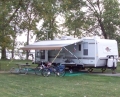
Here see your very nice looking truck and that great Sunny behind it.

Now how did I do that...
Go to your web shots account like this
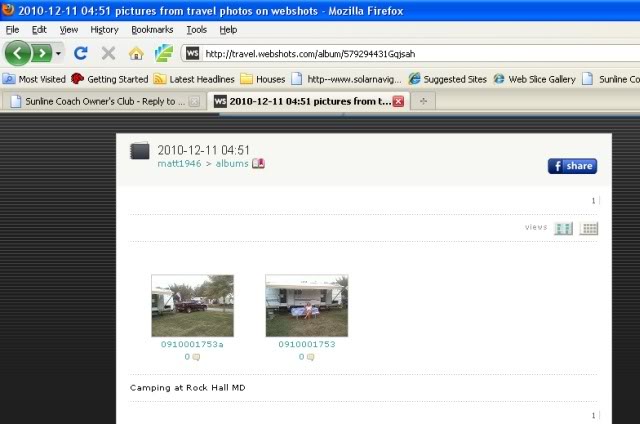
Then pic the picture you want to post here on SOC
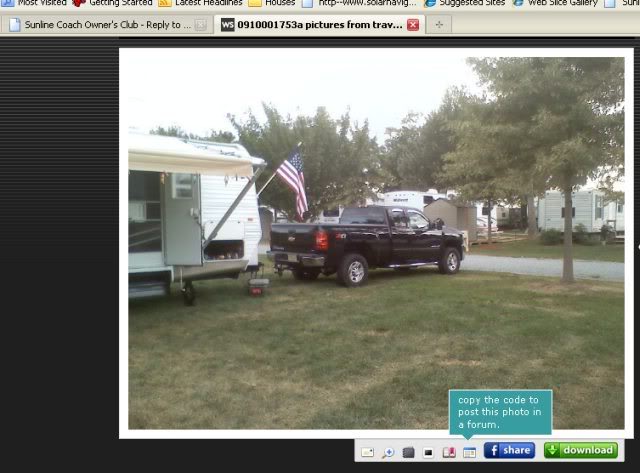
Then in the bottom of that view screen is the little icon with a blue stripe on top next to the Face book icon. It says Copy Code to forums. Press it and it comes up like this.
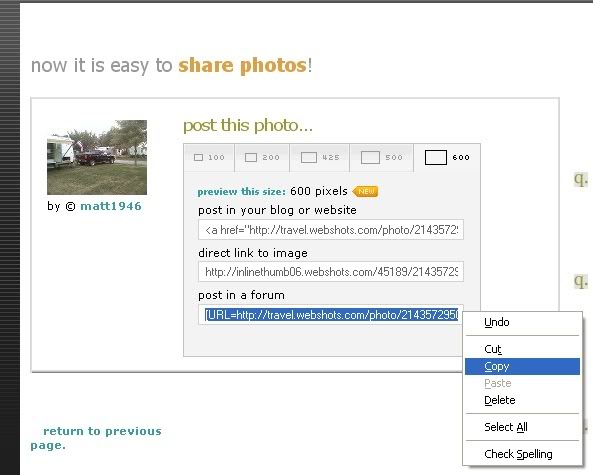
Now it gives you options on the size. Pic the box labeled 600 as that is 600 pixels wide. That creates code that make the pics 600 wide and 640 is the widest we want to use here on the forum so it doe not scroll the screen by folks with older monitors. If you want smaller pic, then select the smaller pixel sizes.
Then go down in the bottom where it says "post in a forum" Click the code in the box, it will turn blue. Then right click and "copy" the code into your PC scrape buffer.
Then flip over to SOC in a post or reply and right click your mouse again and do "paste"
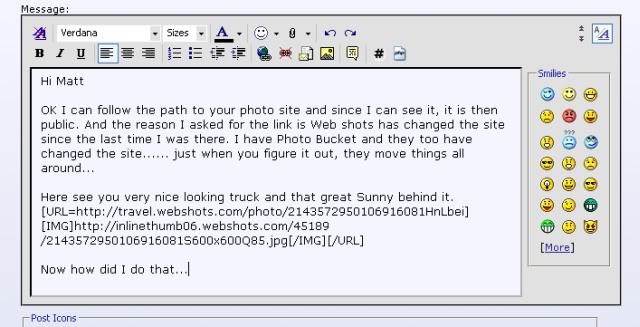
It puts that code all in at once. With the new forum software it will accept that code and will post the pic when you submit the post.
Hope this helps and now that you know how to posts pic, share with your friends here.... That is a nice looking 2004 camper. It has a lot of the same build as mine.
If you need more help, ask away.
John
__________________
Current Sunlines: 2004 T310SR, 2004 T1950, 2004 T2475, 2007 T2499, 2004 T317SR
Prior Sunlines: 2004 T2499 - Fern Blue
2005 Ford F350 Lariat, 6.8L V10 W/ 4.10 rear axle, CC, Short Bed, SRW. Reese HP trunnion bar hitch W/ HP DC
Google Custom Search For Sunline Owners Club
|
|
|
|
|
12-11-2010, 10:17 AM
|
#10
|
|
Member
Join Date: Sep 2010
Posts: 63
SUN #1458
|
Here goes my friend....
__________________
Matt & Ginny
2004 Sunline Solaris 264SR
2008 Silverado 2500 HD LTZ 4x4 6.0L
HD Tow Package\Integrated Brake Ctrl
3.73 LS Rear
|
|
|
|
|
12-11-2010, 10:19 AM
|
#11
|
|
Member
Join Date: Sep 2010
Posts: 63
SUN #1458
|
Thanks for all your help John...looks like it worked  Now how do I do this as my profile photo? Is it done the same way?
__________________
Matt & Ginny
2004 Sunline Solaris 264SR
2008 Silverado 2500 HD LTZ 4x4 6.0L
HD Tow Package\Integrated Brake Ctrl
3.73 LS Rear
|
|
|
|
|
12-11-2010, 07:01 PM
|
#12
|
|
Moderator
Join Date: Nov 2006
Location: Ohio
Posts: 12,654
SUN #89
|
Hi Matt
Cool, now you got it!! So lets see more of the Sunline in action!!! 
Now to the sig. Well yeh, it is about the same way. Since you created a sig you already know to go to the User CP up on the top left of the forum screen
Then go to Edit Signature under the Settings and Options group.
Once in the Edit Signature it will look like this.
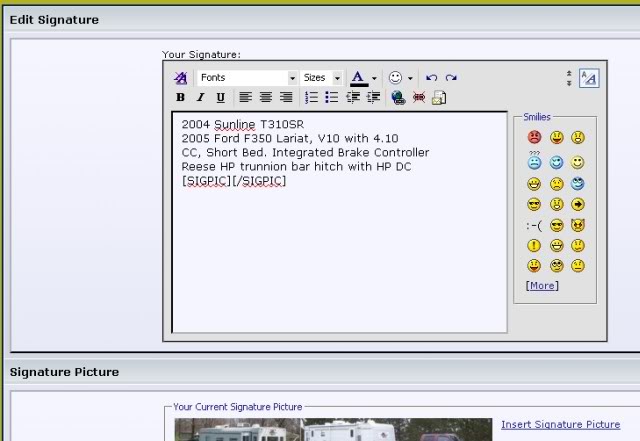
I noticed a hot link to your camper picture in your sig. What you did was inserted the picture link in your sig words area and that created a hot link, not a picture that will view. So go ahead and erase the hot link out of that profile area.
Then scroll down a short ways on that same screen. You will see a signature picture box. Looks like this
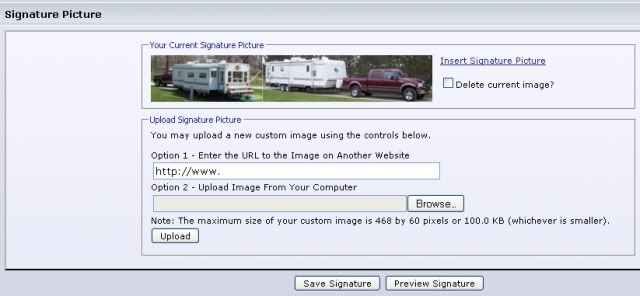
Now here you can insert from your web shots a picture path. Put it in the Option 1 to be linked in from another web site. Or you can upload it from your PC using Option 2.
There are size requirements on the sig pics. Actually I think the forum software will shrink it if you do not. The max forum size is 468 x 100 pixels and no more then 100 meg. So if you have photo editing software shrink your pic down and crop to that size and then either upload it to your Web shots site and use option 1 or upload it direct to the forum using Option 2. Once you fill in Option 1 or Option 2 press the Insert Picture tab. It should then insert the pic after the words of your signature. Then if you like it in the preview, do a "save signature" and it should update in every one of your posts.
You can try linking in the pic you have now in Option 1. The forum software may shrink it automatically. I know it does some auto shrinking I just do not know how much.
Good luck and ask away if you get stuck. We have many here who have done this before too.
Looking forward to seeing your sig pic 
John
__________________
Current Sunlines: 2004 T310SR, 2004 T1950, 2004 T2475, 2007 T2499, 2004 T317SR
Prior Sunlines: 2004 T2499 - Fern Blue
2005 Ford F350 Lariat, 6.8L V10 W/ 4.10 rear axle, CC, Short Bed, SRW. Reese HP trunnion bar hitch W/ HP DC
Google Custom Search For Sunline Owners Club
|
|
|
|
|
12-12-2010, 02:54 PM
|
#13
|
|
Moderator
Join Date: Nov 2006
Location: Ohio
Posts: 12,654
SUN #89
|
Matt, I see you have the sig pic working.  Good job!
__________________
Current Sunlines: 2004 T310SR, 2004 T1950, 2004 T2475, 2007 T2499, 2004 T317SR
Prior Sunlines: 2004 T2499 - Fern Blue
2005 Ford F350 Lariat, 6.8L V10 W/ 4.10 rear axle, CC, Short Bed, SRW. Reese HP trunnion bar hitch W/ HP DC
Google Custom Search For Sunline Owners Club
|
|
|
|
|
12-12-2010, 06:09 PM
|
#14
|
|
Member
Join Date: Sep 2010
Posts: 63
SUN #1458
|
John, Thanks for all your help as I could have not have done this without it. I will be posting more photos now of my TT & Travels as soon as I get the Sunny out from under the tarps. Was looking at it today & thinking of spring & on the road again. Planning to go across country perhaps this year. Once again thanks. May this coming year be a blessed one for you bring you health, prosperity & peace
PS without making myself a pest how do I put a photo in my User CP under my name like yours?
Matt 
__________________
Matt & Ginny
2004 Sunline Solaris 264SR
2008 Silverado 2500 HD LTZ 4x4 6.0L
HD Tow Package\Integrated Brake Ctrl
3.73 LS Rear
|
|
|
|
|
12-12-2010, 06:37 PM
|
#15
|
|
Senior Member
Join Date: Nov 2006
Location: New York
Posts: 2,909
SUN #93
|
Matt it is showing in your sig now
__________________
Kathy & Leo SUN 093
Central Adirondacks of New York
2013 Rubicon 2900 Toy Hauler
We loved our 2007 T-2499
2010 Ford F-350 4x4 Lariat Super Crew Dually Diesel

|
|
|
|
|
12-12-2010, 07:09 PM
|
#16
|
|
Moderator
Join Date: Nov 2006
Location: Ohio
Posts: 12,654
SUN #89
|
Quote:
Originally Posted by matti

PS without making myself a pest how do I put a photo in my User CP under my name like yours?
Matt
|
Matt
1st Thank you very much for the thanks!!!! Same goes to you!
And a fellow Sunliner or camper is never a pest... ask away. I'm glad I can help. Plus I'm getting all these steps loaded up in pics. Many here need the same assistance too so your post helps many others.
Since your a wiz now at pic posting
They call the little pic of yourself or your camper that shows up under your screen name an Avatar.
Go to your CP control panel once again. Look for "Edit Avatar" Click it. It comes up and looks like this.
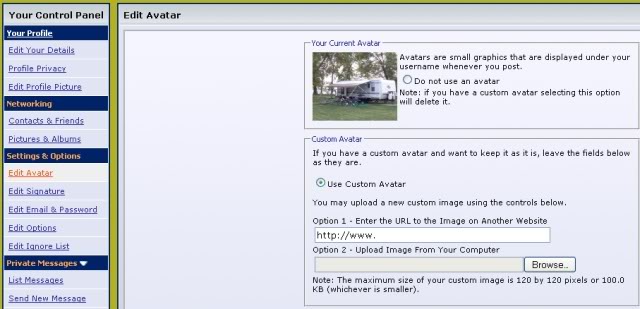
You do the same process like you did to add a signature pic. There is option 1 using a pic on a file server or option 2 to upload off your PC. Once you load the file path, click "save" on the bottom of the screen and it will load it.
The forum is looking for a pic no larger then 120 x 120 pixels and no bigger file size of 100 meg. I think it too will chop a pic smaller or to that size if you try to load a larger one. That pixel size is all that will fit in that spot.
So give it a try and ask away if you need more help on this or anything else on your Sunline, truck, hitch or anything camping....
John
__________________
Current Sunlines: 2004 T310SR, 2004 T1950, 2004 T2475, 2007 T2499, 2004 T317SR
Prior Sunlines: 2004 T2499 - Fern Blue
2005 Ford F350 Lariat, 6.8L V10 W/ 4.10 rear axle, CC, Short Bed, SRW. Reese HP trunnion bar hitch W/ HP DC
Google Custom Search For Sunline Owners Club
|
|
|
|
|
12-13-2010, 06:35 AM
|
#17
|
|
Member
Join Date: Sep 2010
Posts: 63
SUN #1458
|
Papa & Nanna, Thanks for the shout out!!!
John Thanks again!!!
__________________
__________________
Matt & Ginny
2004 Sunline Solaris 264SR
2008 Silverado 2500 HD LTZ 4x4 6.0L
HD Tow Package\Integrated Brake Ctrl
3.73 LS Rear
|
|
|
|
|
|
Currently Active Users Viewing This Thread: 1 (0 members and 1 guests)
|
|
|
 Posting Rules
|
You may not post new threads
You may not post replies
You may not post attachments
You may not edit your posts
HTML code is Off
|
|
|
|
 » Recent Sunline Discussions
 |
|
|
|
|
|
|
|
|
|
|
|
|
|
|
|
|
|
|
|
|
|
|
|
|
|
















 Linear Mode


