Sunline RV Forum
Sunline User Photos

Go Back   Sunline Coach Owner's Club > Sunline Club Community Forums > Sunline Community

Join Sunline Club Forums Today


Reply
 
Thread Tools Search this Thread Display Modes
Old 02-21-2010, 03:51 PM   #43
Senior Member
 
luvrque's Avatar
 
Join Date: Feb 2008
Location: New York
Posts: 189
SUN #517
luvrque
Quote:
Originally Posted by Sunline Fan
Hi Joe,

I think the problem here is the hosting site you are using doesn't recognize the picture as a picture. They have some underlying formatting to it. In other words, the web address doesn't have .jpg in it anywhere.

I've uploaded it to an SOC photobucket account I created. Feel free to link to this, I won't delete it.

This offer does apply to anyone here, if you'd like a picture in your signature, I'd be glad to host it here.

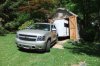
BTW Joe, that is an interesting storage facility you have there, did you build for the Que?

Here's the link to your picture, minus the quotes just inside the IMG tags. I shaved a little off the top and bottom so that it would be easier to see the Que. If you'd like the original, let me know and I'll put the original there:

[IMG]"http://i255.photobucket.com/albums/hh133/socforums/Qsig.jpg"[/IMG]

Jon
Hi Jon
Thanks for helping....I can't get to see it on Photobucket..
Do I need to sign up to Photobucket ?
You can send me a PM

Yes the barn in the photo was built just for the QUE...

__________________
Joe & Donna

2007 Que RE
2011 Tahoe LTZ 4WD 6spd. w/HD Trailering Pkg: Eng. & Trans. HD Oil Coolers plus Intergrated Trailer Brake Controller.
http://i255.photobucket.com/albums/h...orums/Qsig.jpg
luvrque is offline   Reply With Quote
Old 05-14-2010, 05:22 PM   #44
Senior Member
 
EMD_Driver's Avatar
 
Join Date: Jul 2009
Location: West Virginia
Posts: 1,299
SUN #897
EMD_Driver is an unknown quantity at this point
Send a message via MSN to EMD_Driver Send a message via Yahoo to EMD_Driver
With the new forum software, you will no longer need to use the IMG code to post pictures.

At the top of each page, is a "user CP" link. To verify your settings are correct, click the link and scroll down the page. On the left side of the page, there are several things you can change. For this, you will need to click on "Edit Options"

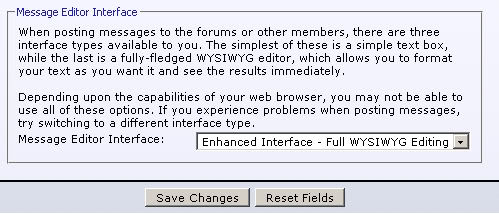
At the bottom of the options page, is the message editor interface box. Make sure you have the wysiwyg option selected. It will look like this:


If it is already selected, great! Save changes and go back to the forums.

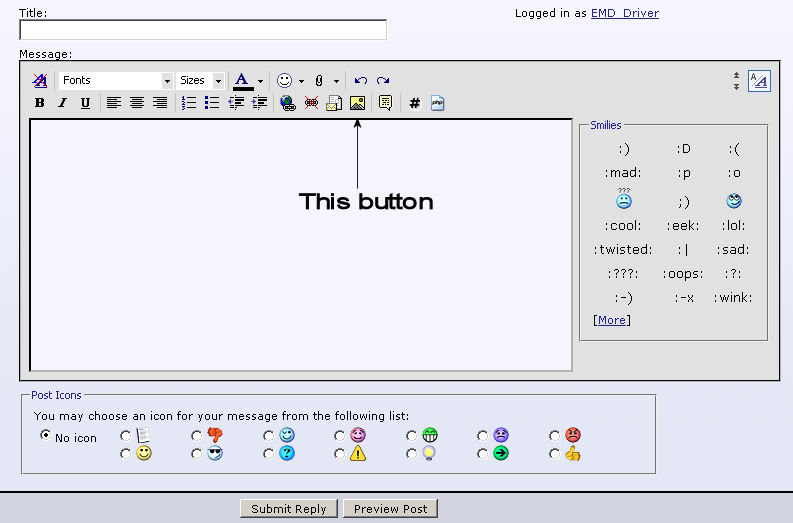
When replying to a post, or making a new post, you will see the post editor box. If you wish to insert a picture in your post, click the "Insert image" button. It will be here:


When you click that button, a small box will come up and ask for the URL to the image. You will need the direct link to the image you have hosted on Photobucket, Webshots, etc... Copy and paste the link into the little box and click ok. The image will be inserted and you will see it right in the reply! This is unlike the previous forum software, where you posted the link with the IMG code and waited for the post to publish, before seeing if you successfully posted a picture.


Gary

__________________
SunlineClub Custom Google Search
Sunny #18 2003 F-344SR #8157
1999 Ford F350XLT DRW Crew Cab, Long bed 7.3 PSD
2002 VW Jetta TDI.. AKA: Kitty's Kruiser

EMD_Driver is offline   Reply With Quote
Old 10-29-2010, 08:28 PM   #45
Moderator
 
JohnB's Avatar
 
Join Date: Nov 2006
Location: Ohio
Posts: 4,546
SUN #89
JohnB is an unknown quantity at this point
Hi Folks

Many camper friends have asked, how do I post a picture here on SOC, I’m still not getting it? We now have new forum software that makes this a little easier so I will update “How to post a pic on SOC”

There are two ways, the first being you have to have your pictures on a photo hosting web site. I’ll go over this method first. In my case I use Image hosting, free photo sharing & video sharing at Photobucket

It looks like this at this time. You can create a free account and if you keep your pictures small, in the 50K size and 640 x 480 pixels, you can store a lot of pic’s for free there. Years worth. Follow the web page in the “learn more” link and sign up for an free account.

In order to post here on SOC or most any other forum you need to select, “view public” on your pictures in your user profile of the photo site. Then they are open to the web publicly for viewing and posting here in our forum. There are other photo servers web sites, also free, Web Shots etc. In this case I will comment on the Photobucket site.



Now once you have your picture uploaded to the photo site and they are tagged as “public” in your photo server profile the rest is pretty straight forward.

Here on SOC create a new post. Type what you like for words and then when you are ready to insert a picture you need to “link” in the picture from your photobucket account. Now open a new internet browser window and bring up your Photobucket account.


Photobucket will look like this.
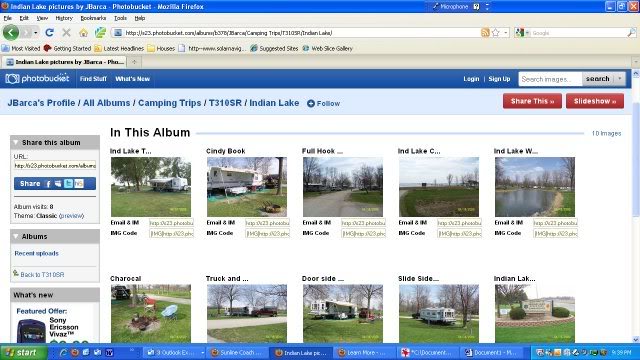

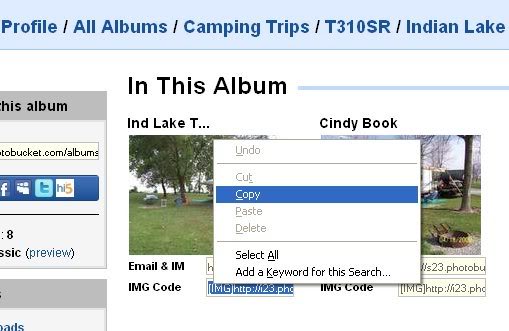
Find the pic you want to post. Notice there is what is called an IMG code under the pic. Put your mouse on the IMG code box to select it. Then right click and you will see "copy". Click it. Now it is copied in your scrap buffer.


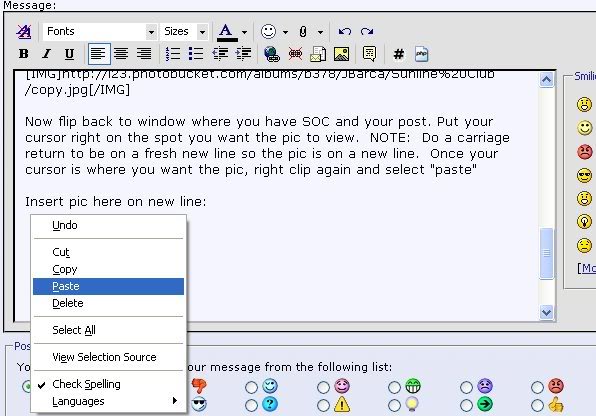
Now flip back to window where you have SOC and your post. Put your cursor right on the spot you want the pic to view. NOTE: Do a carriage return to be on a fresh new line so the pic is on a new line. Once your cursor is where you want the pic, right click again and select "paste"

Insert pic here on new line:


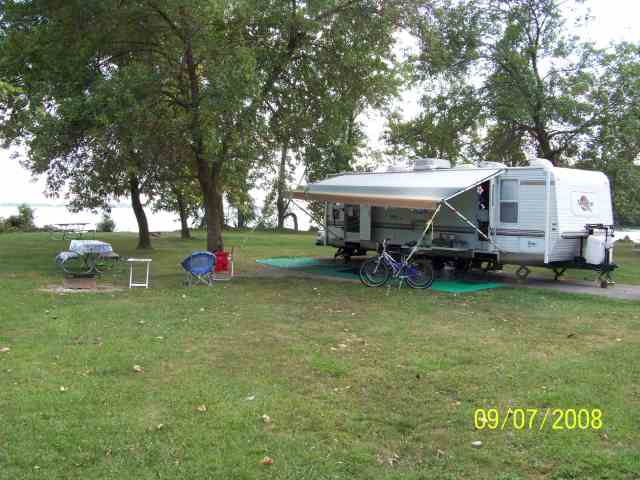
Here it is

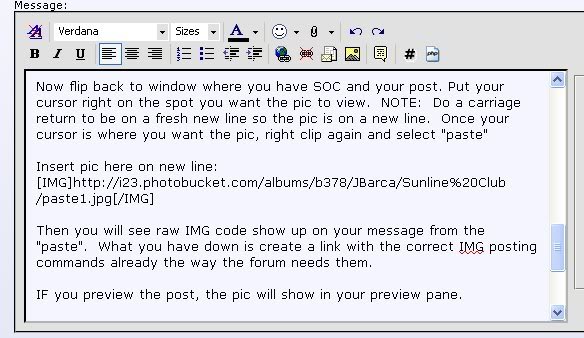
You will notice that you can see the raw IMG code show up on your message from the "paste". What you have done is create a link with the correct IMG posting commands already the way the forum needs them. No typing them manually and to the correct format to view here on SOC.


IF you preview the post, the pic will show in your preview pane. And then when you go back to your message before you save it the actual picture will view in the message window. If you picked the wrong pic or no longer want it, the put your cursor on the pic and hit the delete key. It then removes the pic. Once you hit save on the message window the message will post on the forum and the pic will view.

And that is it. Happy picture posting. If you need help, ask a question.

Notes:

1. For other photo servers you just need to get the correct img code to be posted if you are doing the IMG copy and paste method.

2. If you photoserver does not have img code pre made, then use the post above EMD_Driver made using the postage stamp icon as it creates the IMG commands. The forum needs the IMG codes to view, it is just how they get there is now more simplified.

3. Picture size. Try not to exceed 640 pixels wide and the pic only needs to be around 50K in file size. Folks with older PC monitors it makes the screen scroll real bad to the right being over 640 wide.

4. If you ever move the picture on your photo server from where you first uploaded it, it will break the link and an error will show here on SOC. So organize the pics the way you want to leave them before posting.

5. Images url's need to start with http and end .jpg to be a valid pic format. The IMG codes are then added at the start and end of the url. Most new photo sites have an img code ready to preselect like Photobucket.


Good luck

John

__________________
2004 Sunline T310SR
2005 Ford F350 Lariat, V10 with 4.10
CC, Short Bed. Integrated Brake Controller
Reese HP trunnion bar hitch with HP DC
JohnB is offline   Reply With Quote
Reply


Currently Active Users Viewing This Thread: 1 (0 members and 1 guests)
 
Thread Tools Search this Thread
Search this Thread:

Advanced Search
Display Modes

Posting Rules
You may not post new threads
You may not post replies
You may not post attachments
You may not edit your posts

BB code is On
Smilies are On
[IMG] code is On
HTML code is Off
Trackbacks are Off
Pingbacks are Off
Refbacks are Off


Similar Threads
Thread Thread Starter Forum Replies Last Post
What's right with this picture? EMD_Driver Sunline Community 3 11-28-2009 06:27 PM
new owner picture ronnyr Introduce Yourself 6 07-14-2009 11:32 AM
Give this picture a caption... Makers Mark Sunline Community 8 02-04-2009 09:13 PM
SunlineClub.com is here to stay sunlineclub Announcements, News & Special Events 0 11-17-2006 07:38 AM


Our Communities

Our communities encompass many different hobbies and interests, but each one is built on friendly, intelligent membership.

» More about our Communities

Automotive Communities

Our Automotive communities encompass many different makes and models. From U.S. domestics to European Saloons.

» More about our Automotive Communities

RV & Travel Trailer Communities

Our RV & Travel Trailer sites encompasses virtually all types of Recreational Vehicles, from brand-specific to general RV communities.

» More about our RV Communities

Marine Communities

Our Marine websites focus on Cruising and Sailing Vessels, including forums and the largest cruising Wiki project on the web today.

» More about our Marine Communities


Copyright 2002-2012 Social Knowledge, LLC All Rights Reserved.

All times are GMT -6. The time now is 12:16 AM.